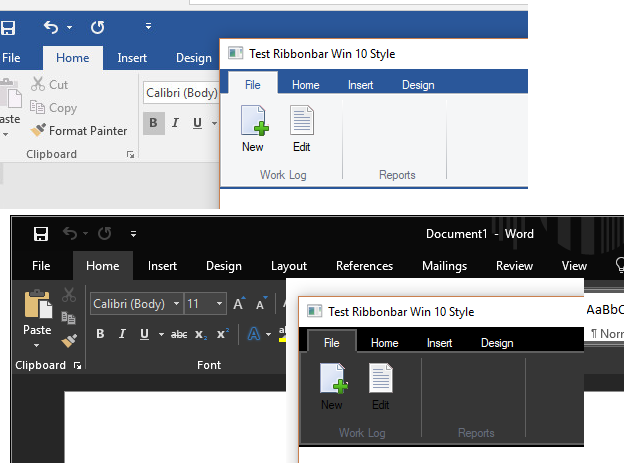
The short answer is that creating a dark theme is not easy.
I have been working on the Ribbonbar for a couple of weeks. It is a very complex set of code which includes several classes. And there are at most, a half-dozen comments in the entire set of classes, so there is a huge learning curve.
There are a number of limitations that prevent you from making changes to colors without resorting to modifing the classes. For example, many of the colors are hardcoded with manifest constants and/or RGB values, so you can't easily override existing colors. Also, the basic ribbonbar is already drawn at the end of the New() method so you can't change lots of things outside the class. One would like to just be able to do:
oRBar:= TRibbonbar():new(...)
oRBar:nClrRBar := RBG(54,54,54)
For some colors you can do this, but for others you can't. Actually most of the colors are arrays for use in creating gradients so you would have to do something like this:
oRBar:= { { 1, RGB( 255, 255, 255 ), RGB( 229, 233, 238 ) } }
Some are also double gradients (4 color values) and others contain IIF() code so they are double-double array codeblocks. Whew!
And there are other issues. The ribbonbar uses outlines (actually double outlines) around the bar and the tabs and the same colors are used for the group separator bars. My objective was originally just to make the bar look like MS Word 2016 (i.e. Windows 10 look). Windows 10 has a very clean a flat look with no gradients or outlines. Thus MS Word has no outlines around the bar or tabs. I can color the outlines the same color as the bar so it seems to disappear, but then the group separator bars also disappear. Thus code in the classes must be changed to draw them each separately and in different colors or gradients.
Additionally, a new style 2018 needs to be created and we still have to maintain the other 4 styles, 2010, 2013, 2015 and 2016 so all changes are going to have to be tested with all styles. And let's throw in a dark theme option for the 2018 style. So that is at least six styles that are going to have to be supported. The existing code is close to 4000 lines in five classes.
Now you can see that adding a dark theme is not a simple task. First we have to create the Windows 10 design, then we have to provide a dark version.
It may sound like I am being critical, however to be clear, whoever wrote the ribbonbar code did a great job on a very complex project. As is common, later one can often see better ways to do some of it. It happens to me often. My intent here is just to point out that creating a dark theme is way more complex that it may seem.
An idea I have had is to use some type of configuration file that stores all the colors and the Ribbonbar class reads them in. This way we could add many themes by only adding to the configuration file. We would probably also need to write a program just to enter the data for the configuration file.