FiveTech Support Forums

FiveWin / Harbour / xBase community
Board index FiveWin for Harbour/xHarbour Ribbon Theme
Posts: 4840
Joined: Fri Nov 18, 2005 04:52 PM
Re: Ribbon Theme
Posted: Tue Oct 23, 2018 05:05 PM
Now some things are starting to make sense to me.

When the l2010 flag is set, aGradFld is used to paint the folder tabs when the mouse moves over them. And for all other flags, aGradOver is used. Here is the code from the PaintFld() method:

Code (fw): Select all Collapse
if ::l2010 .or. nPrompt == ::nStart
   GradientFill( hDCMem, nRow + 1, nCol, nRow + ::nHeightFld + 1, nCol + ::aSizes[ nPrompt ], aGradFld )
else
   GradientFill( hDCMem, nRow + 1, nCol, nRow + ::nHeightFld + 1, nCol + ::aSizes[ nPrompt ], ::aGradOver )
endif


We can fix the color issue by overriding the PaintFld() method and using ::aGradOver even when l2010 is set. This would only be used when configuring the ribbonbar to look like Office 2016. To reiterate, we need to use the l2010 flag to get groups looking close to those in Office. Otherwise, we would have to make lots of overrides to the group class which would be much more work.
FWH 18.05/xHarbour 1.2.3/BCC7/Windows 10
Posts: 811
Joined: Tue May 06, 2008 04:28 AM
Re: Ribbon Theme
Posted: Wed Oct 24, 2018 01:02 AM
Hi Mr. James,

Separator bar can be tricked ... I define mine as blank group ...


Still NO class in anyway was harmed ... :-) :-)

Relative to my previous post...
Code (fw): Select all Collapse
      aTaskGrp[ 2 ] := :AddGroup( 1, '', nDlg )
      WITH OBJECT aTaskGrp[ 2 ]

          :aGradCaption := { { 1, nRGB( 178, 178, 178 ), nRGB( 178, 178, 178 ) } }
          :nClrBoxOut   := nRGB( 160, 160, 160 )
          :nClrBoxIn    := nRGB( 160, 160, 160 )

      END
Kind Regards,

Frances


Fivewin for xHarbour v18.07

xHarbour v1.2.3.x

BCC 7.3 + PellesC8 ( Resource Compiler only)

ADS 10.1 / MariaDB

Crystal Reports 8.5/9.23 DE

xMate v1.15
Posts: 6755
Joined: Wed Feb 15, 2012 08:25 PM
Re: Ribbon Theme
Posted: Wed Oct 24, 2018 01:10 AM
Francis, very good idea
Also ( not all styles? )
Code (fw): Select all Collapse
   oRBar:nGroupSeparation  := 0
Cristobal Navarro

Hay dos tipos de personas: las que te hacen perder el tiempo y las que te hacen perder la noción del tiempo

El secreto de la felicidad no está en hacer lo que te gusta, sino en que te guste lo que haces
Posts: 811
Joined: Tue May 06, 2008 04:28 AM
Re: Ribbon Theme
Posted: Wed Oct 24, 2018 01:26 AM
cnavarro wrote:Francis, very good idea
Also ( not all styles? )
Code (fw): Select all Collapse
   oRBar:nGroupSeparation  := 0


This looks pretty too.. But I leaved mine as default to (:nGroupSeparation := 3), since the gap between group mimics that of Office 2016.

:-)
Kind Regards,

Frances


Fivewin for xHarbour v18.07

xHarbour v1.2.3.x

BCC 7.3 + PellesC8 ( Resource Compiler only)

ADS 10.1 / MariaDB

Crystal Reports 8.5/9.23 DE

xMate v1.15
Posts: 4840
Joined: Fri Nov 18, 2005 04:52 PM
Re: Ribbon Theme
Posted: Wed Oct 24, 2018 01:28 AM
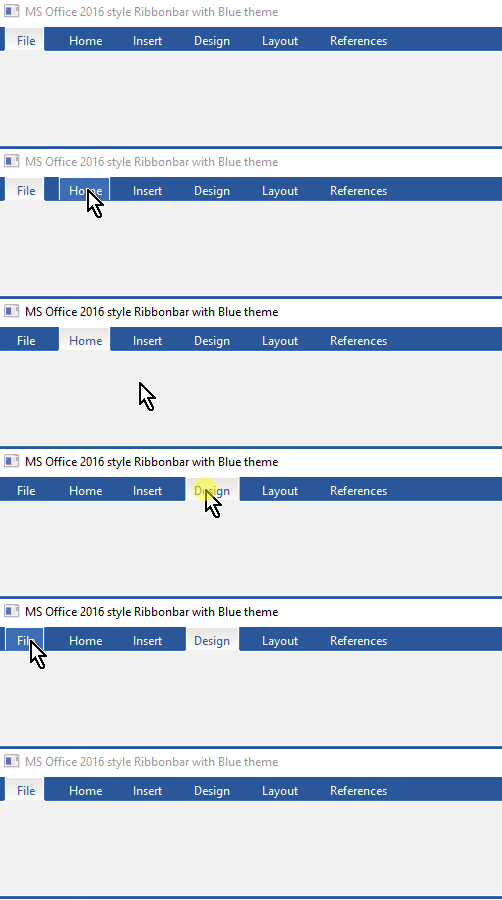
Ok, I was able to override the PaintFld() method so I can use the l2010 flag and still keep the groups like Office 2016. I also had to make some changes in the override method to paint the folders with a different background color. This was only an issue with the Blue Theme of the Office 2016 style.


This is still in a separate test program so it doesn't show the icons and groups. Maybe tommorow I will have that.
FWH 18.05/xHarbour 1.2.3/BCC7/Windows 10
Posts: 811
Joined: Tue May 06, 2008 04:28 AM
Re: Ribbon Theme
Posted: Wed Oct 24, 2018 02:45 AM

Very neat James! :D

Kind Regards,

Frances


Fivewin for xHarbour v18.07

xHarbour v1.2.3.x

BCC 7.3 + PellesC8 ( Resource Compiler only)

ADS 10.1 / MariaDB

Crystal Reports 8.5/9.23 DE

xMate v1.15
Posts: 7318
Joined: Thu Oct 18, 2012 07:17 PM
Re: Ribbon Theme
Posted: Wed Oct 24, 2018 11:23 AM

James, the bottom line is real on winword 2016 ?

Since from 1991/1992 ( fw for clipper Rel. 14.4 - Momos)

I use : FiveWin for Harbour March-April 2024 - Harbour 3.2.0dev (harbour_bcc770_32_20240309) - Bcc7.70 - xMate ver. 1.15.3 - PellesC - mail: silvio[dot]falconi[at]gmail[dot]com
Posts: 4840
Joined: Fri Nov 18, 2005 04:52 PM
Re: Ribbon Theme
Posted: Wed Oct 24, 2018 02:39 PM
Silvio wrote:
James, the bottom line is real on winword

If you mean the line under the ribbonbar, no it is not on MS Word 2016. I have not yet figured out how to turn it off.

James
FWH 18.05/xHarbour 1.2.3/BCC7/Windows 10
Posts: 1364
Joined: Wed Jun 21, 2006 12:39 AM
Re: Ribbon Theme
Posted: Wed Oct 24, 2018 03:05 PM

James, what software do you use to make those animations? Thanks

Saludos

Posts: 7318
Joined: Thu Oct 18, 2012 07:17 PM
Re: Ribbon Theme
Posted: Wed Oct 24, 2018 03:19 PM
I'm not a GIRL...:-)

I not understood why there is wrote "Silvia Wrote"
Since from 1991/1992 ( fw for clipper Rel. 14.4 - Momos)

I use : FiveWin for Harbour March-April 2024 - Harbour 3.2.0dev (harbour_bcc770_32_20240309) - Bcc7.70 - xMate ver. 1.15.3 - PellesC - mail: silvio[dot]falconi[at]gmail[dot]com
Posts: 4840
Joined: Fri Nov 18, 2005 04:52 PM
Re: Ribbon Theme
Posted: Thu Oct 25, 2018 05:51 AM
Horatio,

It's called Screen to GIF.

http://www.Screentogif.com
FWH 18.05/xHarbour 1.2.3/BCC7/Windows 10
Posts: 4840
Joined: Fri Nov 18, 2005 04:52 PM
Re: Ribbon Theme
Posted: Thu Oct 25, 2018 05:55 AM

Silvio,

My apologies, it was not intentional. Sometimes the spell corrector does strange things and I don't always remember to check after I have typed something.

FWH 18.05/xHarbour 1.2.3/BCC7/Windows 10
Posts: 7318
Joined: Thu Oct 18, 2012 07:17 PM
Re: Ribbon Theme
Posted: Thu Oct 25, 2018 10:17 AM

quiet my friend was just a joke

Since from 1991/1992 ( fw for clipper Rel. 14.4 - Momos)

I use : FiveWin for Harbour March-April 2024 - Harbour 3.2.0dev (harbour_bcc770_32_20240309) - Bcc7.70 - xMate ver. 1.15.3 - PellesC - mail: silvio[dot]falconi[at]gmail[dot]com
Posts: 4840
Joined: Fri Nov 18, 2005 04:52 PM
Re: Ribbon Theme
Posted: Thu Oct 25, 2018 05:24 PM
This started out as a project to apply themes to the Ribbonbar, and digressed into trying to get the ribbonbar to look like MS Word 2016. I had never used the ribbonbar before so I was not familiar with it.

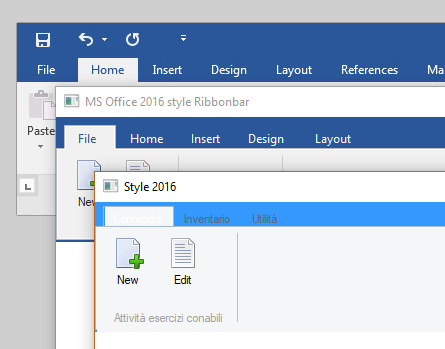
I went back and just looked at the stock FW ribbonbar styles. I found that some of the other styles are much better recreations of early Office styles, particularly the 2010 version. However, I found that the 2016 stock style is poor replication of the Office 2016 style. This added a lot of work fixing this outside of the class.


The top image is Word 2016, the middle image is my version of 2016, and the bottom one is the ribbonbar's stock version of 2016. The stock 2016's tabs are too short, the text color is unreadable, the colors are wrong, etc. It is a lot of work fixing these things outside the class.

So my thought now is that the stock ribbonbar class should be modified to replicate the image shown in the middle above. Then all we need to do outside the class, is to set the theme colors. I would also like to add a few new class data variables to the class to make setting the colors outside the class easier.

I know some of you are not wanting the class modified, so I am asking for thoughts on doing what I am suggesting. I will be glad to make these changes myself and submit them to Antonio for addition to the next FWH release.

I do not know who the author, or authors, were of the ribbonbar class, but they did a great job on it. This is probably the most complex piece of code I have worked on. Sometimes I thought my head was going to explode just trying to understand the complexity. Kudos to all for the hard work that went into this class.

Any thoughts?
FWH 18.05/xHarbour 1.2.3/BCC7/Windows 10
Posts: 7318
Joined: Thu Oct 18, 2012 07:17 PM
Re: Ribbon Theme
Posted: Thu Oct 25, 2018 05:33 PM

I think we must create on RibbonBar class a new method called SetStyle and insert on this all colors of all style l2007,l2010, l2013, l2015,l2016

this for each classes : ribbonbar buttonribbon groupribbon

on this method we can set the colors

Since from 1991/1992 ( fw for clipper Rel. 14.4 - Momos)

I use : FiveWin for Harbour March-April 2024 - Harbour 3.2.0dev (harbour_bcc770_32_20240309) - Bcc7.70 - xMate ver. 1.15.3 - PellesC - mail: silvio[dot]falconi[at]gmail[dot]com