

Frances,
Glad to hear you got it working.
I now see that you were talking about the tab color and I was thinking the button hover color.
FWH 18.05/xHarbour 1.2.3/BCC7/Windows 10
Frances,
Glad to hear you got it working.
I now see that you were talking about the tab color and I was thinking the button hover color.
Frances,
Still no class modification.
Hi James,
You are correct. Eventually, we cannot avoid modifying the class.

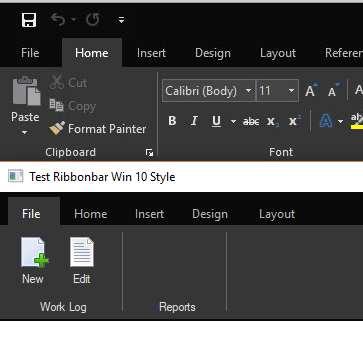
James Bott wrote:Now we have separator bars.
I also adjusted the text to the right colors. Oh, and I did it without any class modifications.
I have to leave now but I will explain how to do the separator bars tommorow.
James

James Bott wrote:Frances,
Still no class modification.
There is still at least one thing you cannot do without class modification. You cannot draw group separator bars without also drawing outlines. This is a show-stopper if you want an exact look like Office.
All that needs to be done is to provide a new color variables for separator bars which defaults to the same colors as "box" outlines. Then when you set the outlines to the same color as the ribbonbar (to make them disappear), then you can still set the color of the separator bars to whatever color you wish.
It would also be nice to have this new color as a passable parameter to the button's New() method.
However, I think a much better way to do this is by adding color variables to the ribbonbar class that will then automatically passed to every button by passing the oBar which is already happening.
James
   ADD GROUP oGr1 RIBBON oBar TO OPTION 1  WIDTH 120  PROMPT "Work Log"

   // Controls the group title text color
   oGr1:nClrTxt := RGB( 224,224,224 ) // Black theme

   // These 2 control the separator bar colors
   oGr1:nClrBoxOut:= RGB(102,102,102) // Black theme
oGr1:nClrBoxIn:= RGB(102,102,102) // Black themeSilvio wrote:
But You could make an Override to RibbonBar(rbgroup,rbtn) Class
if oWnd:IsKindOf( "TRPANEL" ) .and. oRB != NILFrances,
Do you have any idea how to change the tab text color when hovering over it. The blue theme has white text on a dark blue background, then when you hover over it the tab background turns white and thus the text disappears. I need to change the text on the tab to a dark color when you hover the pointer over it.
Any ideas?
Thanks,
James
#define CLRTEXT             RGB(  21,  66, 139 )

.../...
   oRBar:nClrPaneRB := Rgb( 43, 87, 154 )
   nClrTabText   := CLR_WHITE
   For x = 1 to Len( oRBar:aClrTabTxt )
      oRBar:aClrTabTxt[ x ] := { | oSelf, nPrompt | ;
                       if( oSelf:l2013 .or. oSelf:l2015,;
                          if( nPrompt == oSelf:nOption, RGB( 255, 255, 255 ), ;
                              if( oSelf:l2015, nClrTabText, RGB( 100, 100, 100 ) ) ),;
                          if( oSelf:l2016, ;
                              if( nPrompt == oSelf:nOption, ;
                                  oRBar:nClrPaneRB, nClrTabText ), CLRTEXT ) ) }
Next xJames Bott wrote:Frances,
Do you have any idea how to change the tab text color when hovering over it. The blue theme has white text on a dark blue background, then when you hover over it the tab background turns white and thus the text disappears. I need to change the text on the tab to a dark color when you hover the pointer over it.
Any ideas?
Thanks,
James
 :aGradOver  :=   { { 1, nRGB( 0, 114, 198 ), nRGB( 0, 114, 198 ) } }
 ...
  FOR i := 1 TO Len( :aPrompts )
        :aClrTabTxt[ i ] := {|oSelf, nPrompt| iif( nPrompt == oSelf:nOption, nRGB(0,0,0), nRGB( 255, 255, 255 ) )}
 NEXT
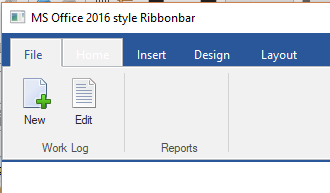
...

Frances,
Thanks for the video. I looked back at your code on the previous page where you showed how to get that effect with the tabs. I see that you used aGradOver. I have never been able to see any affect by either passing that array to the New() method or redefining it after the New() method.
I have had the same problem with the aGradNormal array--no effect I can see.
I am using FWH 18.05 and I see you are using 18.07. Maybe that is the issue. I think I am going to have to modify 18.05's TRibbonbar class method MouseHover() to see what is happening.
OK, I just discovered that aGradOver is not working (it is ignored) with l2010, but it works fine with l2016.
All my work has been done with the l2010 flag since it makes groups the most similar to Office 2016.
So now I have to figure out where the bug is.
James


