FiveTech Support Forums

FiveWin / Harbour / xBase community
Board index FiveWin for Harbour/xHarbour Ribbon Theme
Posts: 4840
Joined: Fri Nov 18, 2005 04:52 PM
Re: Ribbon Theme
Posted: Fri Oct 05, 2018 03:33 PM
Ribbonbar Themes

I did find that there are two "dark" themes in Office 2016, the Black theme, and the Dark Gray theme. All the more reason we need some type of configuration file that we can use to store multiple themes. And a small utility program we can use to define each theme. And to make this simple, we need to eliminate the use of manifest constants and RGB values in the classes and replace them with variables.
FWH 18.05/xHarbour 1.2.3/BCC7/Windows 10
Posts: 4840
Joined: Fri Nov 18, 2005 04:52 PM
Re: Ribbon Theme
Posted: Fri Oct 05, 2018 04:09 PM
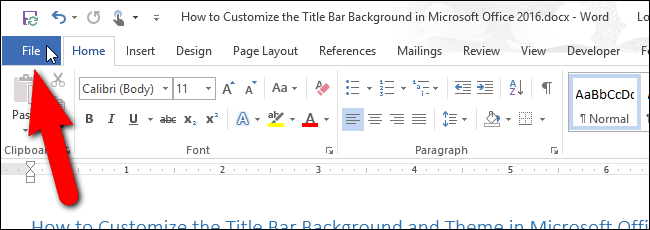
Silvio wrote: I saw the word 2016 have the tabs more big I think we can make it.

Yes, I have already done that. See my previous screenshots with both Word and my version of FWH's Ribbonbar.

oBar:nHeightFld := 22
FWH 18.05/xHarbour 1.2.3/BCC7/Windows 10
Posts: 7317
Joined: Thu Oct 18, 2012 07:17 PM
Re: Ribbon Theme
Posted: Fri Oct 05, 2018 04:31 PM
James is right all you sad

But wich color I need ?

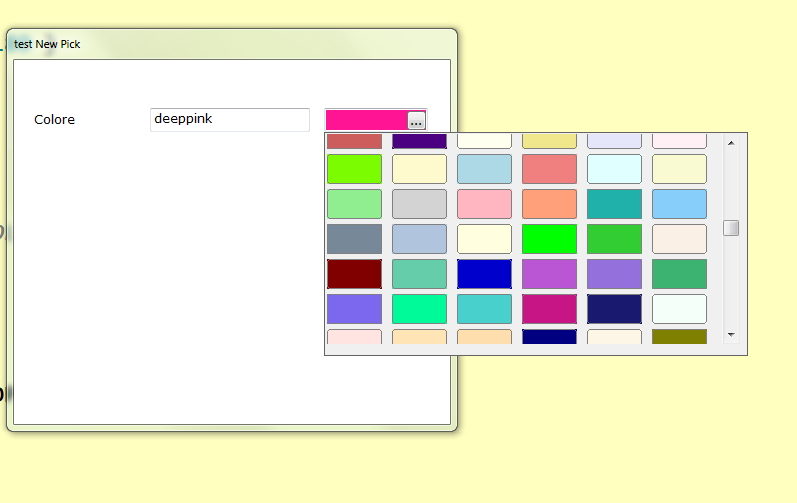
I have a list of Office colors ( total 138 colors) (I found it on the web )
and I use a function made by me to select these colors on my application ( and not choose colors function )

Since from 1991/1992 ( fw for clipper Rel. 14.4 - Momos)

I use : FiveWin for Harbour March-April 2024 - Harbour 3.2.0dev (harbour_bcc770_32_20240309) - Bcc7.70 - xMate ver. 1.15.3 - PellesC - mail: silvio[dot]falconi[at]gmail[dot]com
Posts: 7317
Joined: Thu Oct 18, 2012 07:17 PM
Re: Ribbon Theme
Posted: Fri Oct 05, 2018 04:46 PM


I think

oRebar:nHeightFld := 22
oRebar:hSeparation := 6

the tabs are more near to another look the image

then I found this at word2016

Since from 1991/1992 ( fw for clipper Rel. 14.4 - Momos)

I use : FiveWin for Harbour March-April 2024 - Harbour 3.2.0dev (harbour_bcc770_32_20240309) - Bcc7.70 - xMate ver. 1.15.3 - PellesC - mail: silvio[dot]falconi[at]gmail[dot]com
Posts: 4840
Joined: Fri Nov 18, 2005 04:52 PM
Re: Ribbon Theme
Posted: Fri Oct 05, 2018 05:29 PM

Silvio,

I have been getting the Office colors using screenshots from the web, and a utility program to read the colors off the screen. Here are the ones I am using.

// Microsoft Office 2016 colors
nMSRed := RGB(182,71,43)
nMSGreen:= RGB(33,114,69)
nMSBlue:= RGB(42,87,154)
nMSPurple := RGB(128,57,123)
nMSRibbon := RGB(141,141,141)

// Dark Gray Theme
nMSBackground := RGB(68,68,68)
nMSRibbon := RGB(178,178,178)

// Black Theme
nMSBackground := RGB(10,10,10)
nMSRibbon := RGB(54,54,54)

If you would like a copy of my color reading utility, let me know.

I would be interested in seeing the MS Office colors you found on the web.

FWH 18.05/xHarbour 1.2.3/BCC7/Windows 10
Posts: 7317
Joined: Thu Oct 18, 2012 07:17 PM
Re: Ribbon Theme
Posted: Fri Oct 05, 2018 07:53 PM

james
colors sent

and for the button wich colors we use ?

Since from 1991/1992 ( fw for clipper Rel. 14.4 - Momos)

I use : FiveWin for Harbour March-April 2024 - Harbour 3.2.0dev (harbour_bcc770_32_20240309) - Bcc7.70 - xMate ver. 1.15.3 - PellesC - mail: silvio[dot]falconi[at]gmail[dot]com
Posts: 4840
Joined: Fri Nov 18, 2005 04:52 PM
Re: Ribbon Theme
Posted: Fri Oct 05, 2018 11:59 PM
Silvio wrote: and for the button which colors we use ?

I assume you mean for the mouse over color (it is not a gradient so there is only one color).

The color I have is RGB(197,197,197) which I got from a paused screen of a YouTube video of an Office product. I had to pause the video right when the presenter put the cursor over a button, then use my screen color reader to get the RGB value.

I have spend close to an hour searching the net for a list of the official color values for Office themes with no luck. And it can be confusing since there are also color themes for use making documents, spreadsheets, or presentations using Office products. I think these are the ones that you found, Silvio.

I did come across this discription of three office themes which gave me a laugh.

...standing in a blizzard white, poke you in the eye colorful, or almost a goth dark gray.
FWH 18.05/xHarbour 1.2.3/BCC7/Windows 10
Posts: 811
Joined: Tue May 06, 2008 04:28 AM
Re: Ribbon Theme
Posted: Sat Oct 06, 2018 04:13 AM
James Bott wrote:Frances,

Impressive!

I find it interesting that Outlook 2016 and Word 2016 have different dark themes. Word's theme is much darker. Are there two dark themes to pick from? I don't have a copy of Office 2016 here to look at--I am using screenshots.


Thanks James!

But my Office 2016 has only one 'Dark Gray' theme.

:-)
Kind Regards,

Frances


Fivewin for xHarbour v18.07

xHarbour v1.2.3.x

BCC 7.3 + PellesC8 ( Resource Compiler only)

ADS 10.1 / MariaDB

Crystal Reports 8.5/9.23 DE

xMate v1.15
Posts: 4840
Joined: Fri Nov 18, 2005 04:52 PM
Re: Ribbon Theme
Posted: Sat Oct 06, 2018 05:31 AM

I found references on the web that there is both a Dark theme and a Black theme in Office 2016, at least some versions since yours does not. Maybe you missed an update?

If you do a search for "Office 2016 themes" then click on "images" you will see screenshots of both.

FWH 18.05/xHarbour 1.2.3/BCC7/Windows 10
Posts: 811
Joined: Tue May 06, 2008 04:28 AM
Re: Ribbon Theme
Posted: Sat Oct 06, 2018 06:43 AM
James Bott wrote:I found references on the web that there is both a Dark theme and a Black theme in Office 2016, at least some versions since yours does not. Maybe you missed an update?

If you do a search for "Office 2016 themes" then click on "images" you will see screenshots of both.


It's OK James, my Company has only Office 2016 Standard ... I saw some posts that the 'Black' theme is available with 365 subscription or pro...
I can live with Dark Gray Theme as long as it wont strain my user's eye staring with ... :-) :-) :-)

:-)
Kind Regards,

Frances


Fivewin for xHarbour v18.07

xHarbour v1.2.3.x

BCC 7.3 + PellesC8 ( Resource Compiler only)

ADS 10.1 / MariaDB

Crystal Reports 8.5/9.23 DE

xMate v1.15
Posts: 7317
Joined: Thu Oct 18, 2012 07:17 PM
Re: Ribbon Theme
Posted: Sat Oct 06, 2018 11:44 AM

I think we must create on Setstyle Method of Ribbonbar a section type

if ::l2016
Do case
Case nTheme= 1 //DarkGray
Case nTheme= 2 //DarkBlack
Case nTheme= 3 //MsRed
Case nTheme= 4 //MsGreen
Case nTheme= 5 //MsBlue
Case nTheme= 6 //MsPurple
Case nTheme= 7 //MsRibbon
Endcase

Since from 1991/1992 ( fw for clipper Rel. 14.4 - Momos)

I use : FiveWin for Harbour March-April 2024 - Harbour 3.2.0dev (harbour_bcc770_32_20240309) - Bcc7.70 - xMate ver. 1.15.3 - PellesC - mail: silvio[dot]falconi[at]gmail[dot]com
Posts: 4840
Joined: Fri Nov 18, 2005 04:52 PM
Re: Ribbon Theme
Posted: Mon Oct 08, 2018 04:09 PM
Silvia wrote: oRebar:hSeparation := 6


I use a value of 2 which seems about right.
FWH 18.05/xHarbour 1.2.3/BCC7/Windows 10
Posts: 811
Joined: Tue May 06, 2008 04:28 AM
Re: Ribbon Theme
Posted: Mon Oct 08, 2018 11:49 PM
James Bott wrote:
Silvia wrote: oRebar:hSeparation := 6


I use a value of 2 which seems about right.


I used :hSeparation := 4 based on my font Verdana ...

:-)
Kind Regards,

Frances


Fivewin for xHarbour v18.07

xHarbour v1.2.3.x

BCC 7.3 + PellesC8 ( Resource Compiler only)

ADS 10.1 / MariaDB

Crystal Reports 8.5/9.23 DE

xMate v1.15
Posts: 4840
Joined: Fri Nov 18, 2005 04:52 PM
Re: Ribbon Theme
Posted: Tue Oct 09, 2018 05:03 PM
Frances wrote: I used :hSeparation := 4 based on my font Verdana


I do remember noticing that File Manager and MS Word do not use the same font on the ribbonbar. I figured out which font MS Word was using but I didn't write it down apparently. File Manager uses the same font as our Ribbonbar does by default.

James
FWH 18.05/xHarbour 1.2.3/BCC7/Windows 10
Posts: 4840
Joined: Fri Nov 18, 2005 04:52 PM
Re: Ribbon Theme
Posted: Thu Oct 11, 2018 08:23 PM

Frances,

I am quite sure that the font being used in Office 2016 is Segoe UI 12pt.

oBar:oFont := TFont():New("Segoe UI",0,-12)

However, I have seen another font in one screenshot of Word 2016, in which the capital I has serifs. All other Word 2016 screenshots show Segoe UI with no serifs.

James

FWH 18.05/xHarbour 1.2.3/BCC7/Windows 10